

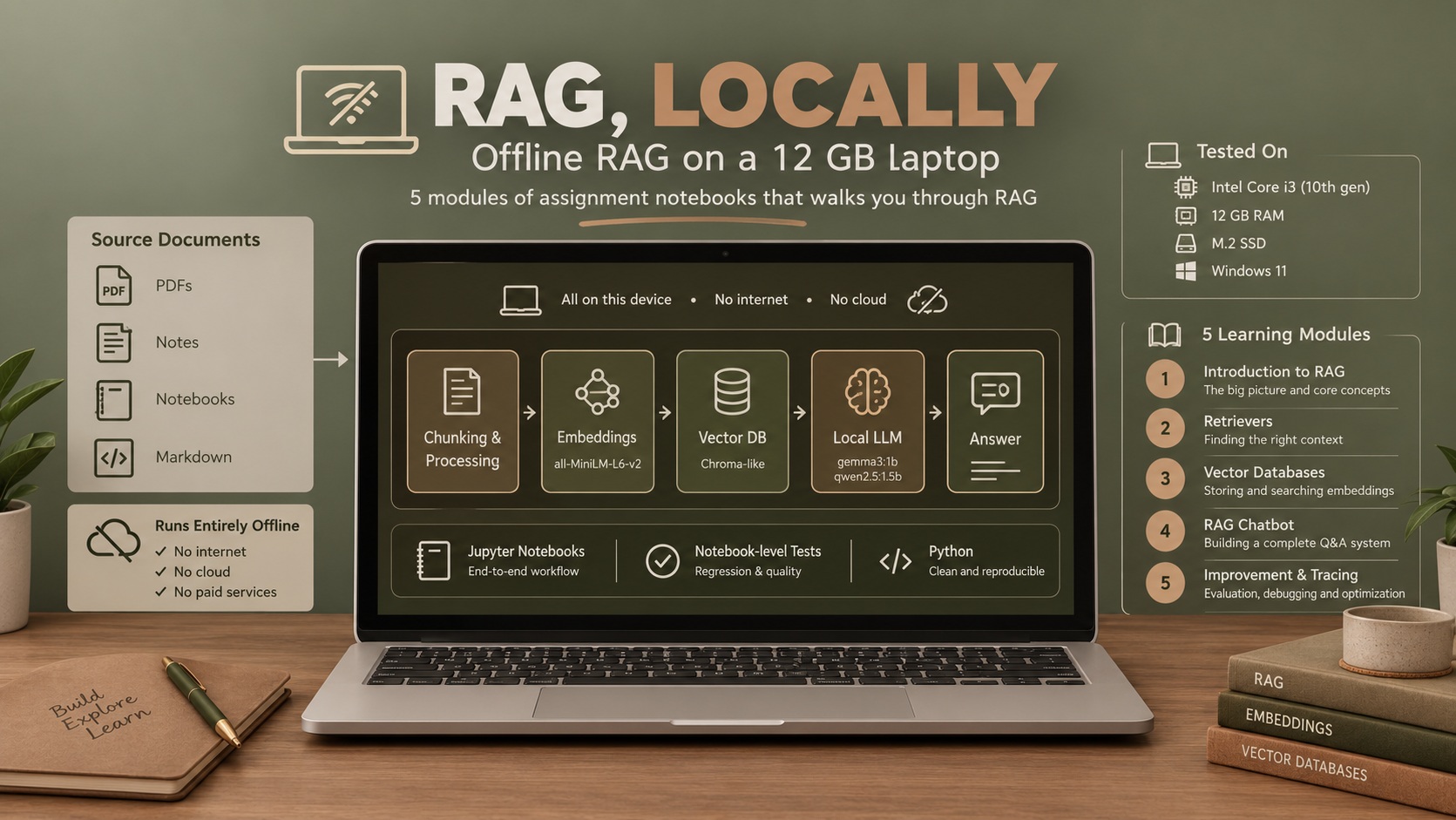
Five course notebooks that assumed a hosted model, a cloud vector database and a hosted tracer — now running on a laptop with no GPU and no network, and tested like code.
The idea worth taking away is the embedding router. On the course’s chatbot, a small model spends a whole LLM call deciding whether a question belongs to the FAQ or the product catalogue, and gets it wrong half the time. Replacing that call with a similarity lookup against the known FAQ questions gets the route right 10 times in 10, doubles the correct answers from 4 to 8 out of 12, and cuts median latency from 161 s to 36 s — by removing a model call rather than improving one. How it was tested.
Engineering track. An open-source adaptation, a notebook test harness and a small benchmark, 2026. Level 1–2 (skeleton).
Code, notebooks and full results on GitHub: Farahani1/rag-dlai-local.
In two minutes
DeepLearning.AI’s Retrieval-Augmented Generation course is built around three hosted services: Together.ai for the language model, Weaviate Cloud for the vector database, and Arize Phoenix for tracing. Each wants an account, and I had trouble reaching them. So I replaced all three with local tools and kept the notebooks as close to the originals as I could.
| The course uses | This repository uses |
|---|---|
| Together.ai (hosted LLM) | Ollama — gemma3:1b for weeks 1–4, qwen2.5:1.5b for week 5 |
| Weaviate Cloud | Chroma, in-process, no server to stand up |
| Arize Phoenix | A local no-op tracer |
The machine it runs on: a 10th-gen Core i3 with four threads, 12 GB of RAM, an M.2 SSD, Windows 11, CPU only. No code path calls an online API or downloads anything at runtime.
A port on its own is a weekend. Two things made this a project.
The notebooks are tested. Notebooks cannot be imported, their cells share one global namespace, and a change in cell 12 can break cell 60 without anyone noticing until a full manual re-run. From week 3 on, each notebook is mirrored as one Python function per cell, and a runner replays those cells in a shared namespace the way a kernel does. A whole notebook runs as a regression test in seconds, with the model and the vector store mocked, and CI runs it on every push.
The small model was measured, not just tolerated. On the week 5 chatbot, a 1.5B model answers 4 of 12 benchmark questions correctly. Most of the failures trace to one step: the model is asked whether a question belongs to the FAQ or the product catalogue, and gets it wrong half the time. Replacing that single LLM call with an embedding router:
Week 5 pipeline, qwen2.5:1.5b, CPU only | Correct | Routed correctly | Median latency |
|---|---|---|---|
| As written in the course | 4 / 12 | 15 / 30 | 161 s |
| Embedding router instead of the routing LLM call | 8 / 12 | 10 / 10 | 36 s |
The largest gain came from taking a model out of a step, not from improving the model. It is the same lesson the voice assistant taught from the other side: the cheapest improvement is often found outside the model.
The story in ten minutes
Read in order, or jump.
- The problem — what the course assumes, and what a 12 GB laptop cannot do
- The adaptation — three decisions, each with its price
- Testing notebooks — regression-testing something that cannot be imported
- The result — where the answers go wrong, and where the time goes
Going deeper
- Appendix — reproducing it, glossary, data and licensing
1. The Problem
What the course assumes
The course has five graded assignments, one per week: an introduction to RAG, retriever functions, a vector database, a RAG chatbot, and improving that chatbot. It is written around large hosted models, which is the right call for teaching — the learner meets RAG, not infrastructure.
The consequence is that a learner without those accounts can read the notebooks but not run them. For a course about building systems, that is most of the value gone.
The constraints
Nothing hosted. No online API calls, no downloads at runtime. Every model and every dataset has to be on disk before the notebook starts. This is also what keeps the test suite side-effect-free.
A laptop CPU. Four threads and 12 GB of RAM put the ceiling at models of roughly
1–1.5B parameters. On this machine, qwen2.5:1.5b reads a prompt at about 20 tokens a
second. That one number explains most of the result.
The course has to survive. The point is to learn RAG the way the course teaches it. Exercises, structure and learning outcomes stay; the deviations are few and deliberate. The original notebooks are not redistributed — an enrolled learner can download them and diff them against the adapted ones to see exactly what changed.
Small models are worse at structured output. Known going in. The week 5 pipeline asks the model to write JSON filters, and a 1.5B model often cannot. Where it fails, the notebook’s own fallback logic runs for real rather than in theory.
What had to be replaced, week by week
| Week | Course topic | Replaced locally |
|---|---|---|
| W1 | Introduction to RAG | Hosted LLM calls → Ollama |
| W2 | Retriever functions | Hosted LLM → Ollama; BM25, embedding and hybrid retrieval run locally |
| W3 | RAG with a vector database | Weaviate Cloud → Chroma; metadata filtering, BM25, hybrid search and reranking reimplemented |
| W4 | A RAG chatbot | Product catalogue moved to Chroma; chat completions → Ollama |
| W5 | Improving a RAG system | Tracing → local no-ops; a second, FAQ collection alongside the product one |
2. The Adaptation
Three decisions shaped it. Each is stated as constraint, decision, and what it cost.
Chroma as the vector database
Constraint. The replacement for Weaviate Cloud had to run in-process on Windows: no server to start, no account, no Docker.
Decision. Chroma, behind a thin ChromaStore wrapper per week. FAISS was ruled out
because it has no metadata filtering, which weeks 3 and 5 depend on. Qdrant and
Weaviate can run locally, but only as a separate server, usually in a container.
Cost. Setup became pip install and nothing else, and the data is a folder. But
Chroma has no built-in BM25, hybrid search or reranking, so those were reimplemented in
each week’s retrieval module, and Weaviate’s filter objects had to be translated into
Chroma where clauses.
The weeks stay separate
Constraint. Each week has to match its own course notebook, which imports its own helpers.
Decision. Every week keeps its own copies of its utilities, store wrapper, embedding and retrieval code, even where they overlap. The only shared code reads the config.
Cost. Duplication: a bug fix sometimes lands in three places. This would be the wrong architecture for an application. It is the right one for a course organised week by week — a learner can open any week on its own, and changing one week cannot break another.
Both code paths are kept
Every mirrored cell takes an adapted flag. adapted=True is the local Ollama and
Chroma code the notebook runs; adapted=False keeps the original cloud code beside it.
Nothing about the adaptation is hidden inside a rewrite — every change sits next to the
thing it replaced.
Two conventions hold the rest together: every path is declared once in config.yaml
and resolved through one module, and all data lives under data/. No path is
hardcoded inside a week.
3. Testing Notebooks
The problem
A notebook is a poor unit of software. It cannot be imported, its cells share one global namespace, and running it end to end needs Ollama, local models and populated vector stores — too slow and too fragile to do after every change. The failure it invites is quiet: an edit in one cell breaks another fifty cells down, and nothing says so.
Mirrors and stateful runners
- A mirror turns every code cell of a notebook into one function,
cell_NN(adapted). Unit tests import those functions directly. - A stateful runner replays the mirror’s cells in order, in one shared namespace,
like a kernel.
run_until(cell_number)runs the notebook up to a given cell. Regression tests use it to run the whole notebook with Ollama, Chroma and the embeddings mocked, which catches cross-cell breakage in seconds.
The notebooks are still what a learner opens. The mirrors exist so that someone changing them finds out what broke before a learner does.
Test tiers
| Tier | Needs | Covers |
|---|---|---|
| Default | Nothing beyond the requirements | Unit, data-contract and full stateful regression runs, all mocked |
notebook | A Jupyter kernel | Selected real notebook cells, executed with small stubs |
local_integration | Ollama running, local models, populated Chroma | Real models and real data through selected notebook paths |
The default tier passes with an empty Hugging Face cache and HF_HUB_OFFLINE=1, so the
“nothing downloads at runtime” rule is tested rather than asserted. GitHub Actions runs
that tier on every push and pull request. The other two stay local by design: CI has no
Ollama, no models and no populated stores.
What it costs
The mirrors are kept in sync with the notebooks by hand. A notebook edit that is not copied into its mirror goes untested. Weeks 1 and 2 are simple enough that they have no mirrors; their tests load the week’s helpers and selected cells directly.
4. The Result
What was measured
The week 5 chatbot, run through the notebook’s own functions, unchanged, with only the
LLM call wrapped for timing. One model, qwen2.5:1.5b, at temperature 0, on the laptop
above.
Twelve questions, committed before any model was run and not changed since:
| Category | Count | Probes |
|---|---|---|
| Direct | 3 | One FAQ entry holds the answer |
| Indirect | 2 | The answer combines two FAQ facts |
| Filter | 3 | The request must become a metadata filter — colour, type, price |
| Limitation | 2 | Negation and counting |
| Insufficient context | 2 | The shop does not cover it; the right answer is to say so |
Scoring is rule-based. Where a rule misjudged an answer, the correction is recorded in the results file with its reason — there are two. The baseline ran three times, and all twelve answers were word-for-word identical across the repeats, so each variant after it ran once.
Why the course pipeline fails on a small model
Four causes, in order of how many answers they cost:
- Routing. The model sends most FAQ questions down the product branch, which never sees the FAQ. This alone accounts for 5 of the 8 wrong answers.
- The filter JSON never parses — 0 of 33 times. In 24 outputs the model wraps the
JSON in a Markdown code fence the parser does not strip. Fifteen contain a bare
nan, which is not JSON: fifteen products have no colour, and becausenan != nanin Python, the set of allowed colours pasted into the prompt holdsnanfifteen times. The model copies it. - The answer prompt has no prices. Asked for shoes under 100, the model is shown no prices, and five of the twelve shoes it returns cost more.
- Negation. Semantic search for handbags that are “not black” retrieves black handbags, and the model does not filter them out.
What the small model does well is worth stating too: when the right context reaches it, its answers are accurate and to the point, and it correctly declines a question about bicycles in a clothing shop.
Before and after
| Variant | What changes | Correct | Filter JSON parsed | Median latency |
|---|---|---|---|---|
| baseline | Nothing — the course pipeline as written | 4 / 12 | 0 / 33 | 161 s |
| parse | Strip the fence; remove nan from the prompt | 3 / 12 | 9 / 11 | 152 s |
| router | Embedding router instead of the routing LLM call | 8 / 12 | 0 / 4 | 36 s |
| both | parse + router | 8 / 12 | 4 / 4 | 34 s |
The parse fix is the instructive one. It does what it says — the filters now parse nine times in eleven — and accuracy goes down. Once the filters are actually used, they turn out to be wrong: invented categories, dropped price limits, “Sports Shoes” for formal shoes. The baseline’s failed parsing had been quietly falling back to an unfiltered search that worked better. Making the error go away and making the answer right were different fixes, which is why every fix was measured on its own.
The router sends a question to the FAQ if its closest match among the 25 FAQ questions clears a cosine-similarity threshold. The threshold was chosen on a separate set of 24 queries about topics and products the benchmark does not use, and committed before any router run. The benchmark played no part in choosing it. The router makes no LLM call and takes milliseconds.
Where the time goes
A product question makes four LLM calls: route, task type, filter, answer. Split by step, from Ollama’s own server log:
| Step | Share of a product question |
|---|---|
| Route (LLM) | 4 % |
| Task type (LLM) | 4 % |
| Filter JSON (LLM) | 42 % |
| Final answer (LLM) | 44 % |
| Embedding, Chroma, everything else | 6 % |
Two long-prompt calls take about 90 % of the time. Retrieval — the part a RAG course is about — takes a few seconds. The filter step costs 42 % of every product question and, as the course wrote it, never produced a usable filter.
The router’s speed comes from somewhere less obvious: Ollama’s prompt cache. The FAQ answer prompt carries all 25 FAQ entries, about 1,330 tokens — at 20 tokens a second, a minute of reading before the first word of the answer. Ollama keeps the processed state of the most recent prompt and reuses any shared beginning, but it keeps only one.
| Call | Reading the prompt | Total |
|---|---|---|
| FAQ prompt, cold | 64.0 s | 65.4 s |
| FAQ prompt, straight after another FAQ | 0.6 s | 3.7 s |
| FAQ prompt, after one unrelated prompt | 66.0 s | 68.6 s |
In the course pipeline every question makes its routing call first, with a different prompt, so every FAQ answer starts cold. Take the routing call away and consecutive FAQ questions answer in three to seven seconds. Product questions do not get faster: their four prompts all differ, so each one starts cold.
The thing I would tell anyone putting a small model on a CPU. The cost of an LLM call is the prompt it reads, not the answer it writes. And a call you add has a second cost that no benchmark of that call will show: it evicts the cache the next call was counting on. Before optimising a call, ask whether the step needs a model at all.
What it did not do
- One model, one laptop. A 4B model was planned as an upper bound and dropped: at these latencies a full run would take several hours.
- Twelve questions. Enough to find the failure modes and trace each one. Not enough to be a leaderboard number, and not presented as one.
- Two cheap variants are untested: Ollama’s constrained JSON output, and putting prices into the answer prompt.
- The mirrors are synced by hand, and weeks 1 and 2 have none.
- Some reranking helpers carried over from the course are not exercised by every notebook path.
Appendix
Supporting material. Nothing here is required to understand the project.
Reproducing it
git clone https://github.com/Farahani1/rag-dlai-local.git && cd rag-dlai-local
python3 -m venv .env && source .env/bin/activate
pip install -r requirements.txt && cp config_example.yaml config.yaml
ollama pull gemma3:1b
jupyter notebook                                   # open w1/C1M1_Assignment.ipynb
Python 3.12 or newer. Weeks 4 and 5 need their vector stores built once. The benchmark:
python benchmark/run.py --model qwen2.5:1.5b --repeats 3                    # baseline, ~1.5 h on the i3
python benchmark/run.py --model qwen2.5:1.5b --repeats 1 --variant router   # or parse / both
python benchmark/summarize.py benchmark/results/*.csv
Full setup for Windows and Linux, the test tiers, the complete results with one failure traced end to end, and the design decisions are in the repository’s docs.
Glossary
| Term | Meaning |
|---|---|
| RAG | Retrieval-Augmented Generation. Fetch relevant documents first, then have the model answer from them. |
| Routing | Deciding which source a question should be answered from — here, the FAQ or the product catalogue. |
| Embedding router | Routing by vector similarity to known questions instead of by asking a language model. |
| Prompt cache | The model server keeping the processed state of a previous prompt, so a new prompt with the same beginning skips re-reading it. |
| Mirror | A .py file holding one function per notebook cell, so the cells can be imported and tested. |
| Stateful runner | Replays mirrored cells in one shared namespace, the way a notebook kernel would. |
Data and licensing
An unofficial adaptation, not affiliated with DeepLearning.AI. The MIT licence covers the adaptation code only — not the course material and not third-party data. The datasets are credited to their authors, with their licences, in the repository.